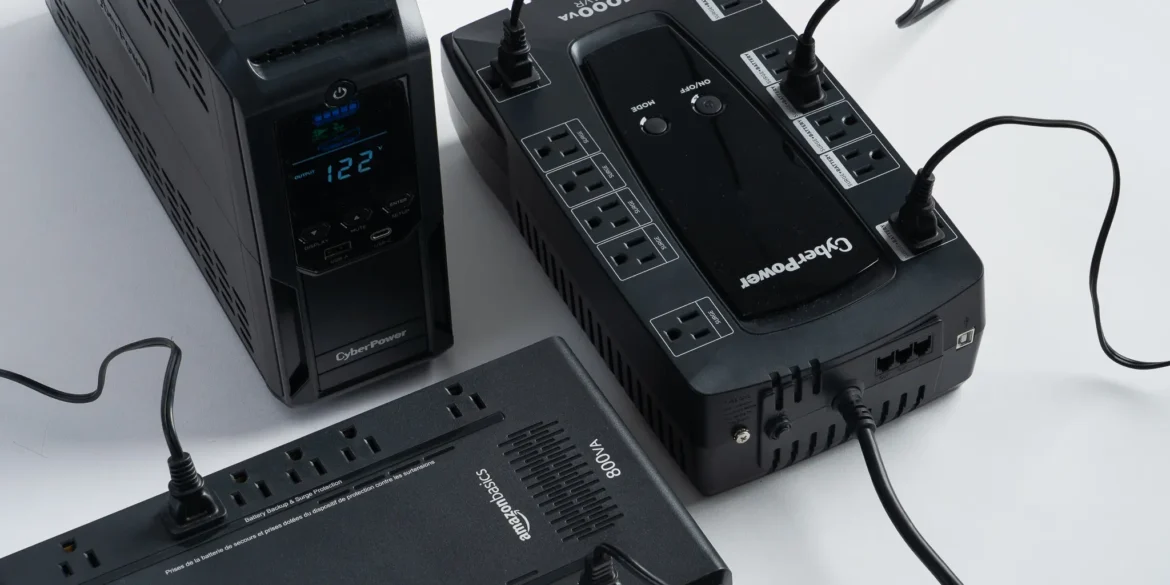
An uninterruptible power supply, commonly called a UPS, provides temporary battery power when electricity fails. It can keep a router and fiber terminal online, give a desktop computer time to shut down safely, or protect a NAS from suddenly losing power during a file transfer.
However, UPS specifications can be confusing. Buyers are presented with volt-amperes, watts, simulated waveforms, pure sine waves, transfer times, battery types, and runtime estimates that change according to the connected load.
The key is to purchase for your actual equipment and desired runtime—not simply the largest VA number advertised on the box.
Quick UPS Comparison
| UPS | Capacity | Ideal For | Notable Feature |
|---|---|---|---|
| APC Back-UPS Connect CP12036LI | 12V DC, 36W | Router, modem, fiber ONT, or IP camera | Compact lithium-ion network backup |
| APC Back-UPS BX1600MI | 1600VA / 900W | General home-office equipment | 230V support and automatic voltage regulation |
| CyberPower CP1500EPFCLCD | 1500VA / 900W | Powerful PCs, workstations, and NAS devices | Pure sine-wave output and active-PFC compatibility |
| Eaton 5S1500G | 1500VA / 900W | Desktop PCs and compact office setups | 230V output, USB communication, and replaceable battery |
Important: The models above are primarily 230V products. Buyers in 120V countries should select the appropriate regional equivalent, such as the CyberPower CP1500PFCLCD. Never connect a 120V UPS to a 230V electrical supply or assume that a plug adapter changes voltage.
What Does a UPS Actually Do?
A UPS normally passes utility power to connected equipment while keeping its internal battery charged. When the input electricity fails or moves outside an acceptable range, the UPS switches supported outlets to battery power.
Depending on the model, a UPS may also provide:
- Surge and spike protection.
- Automatic voltage regulation.
- USB communication with a computer or NAS.
- Automatic system shutdown.
- Battery and load monitoring.
- Telephone, Ethernet, or coaxial surge protection.
- Replaceable batteries.
- Audible outage and overload alarms.
A UPS is usually designed to bridge short outages or provide enough time for a safe shutdown. It should not automatically be treated as an all-night electricity source. Longer outages may require a larger portable power station, inverter system, solar battery, or generator.
APC Back-UPS Connect CP12036LI: Keep the Internet Equipment Running
If your main objective is maintaining internet access, a small DC network UPS may be more efficient than a full-sized AC unit. The APC Back-UPS Connect CP12036LI is designed for compatible 12-volt networking equipment.
It can protect devices such as routers, modems, certain fiber terminals, and IP cameras. APC supplies multiple DC connector tips, although you must still confirm the voltage, polarity, plug size, and power requirement of your equipment.
APC advertises up to four hours of runtime for an average router. Actual runtime depends on the router’s power consumption, battery condition, temperature, and whether more than one device is connected.
A DC UPS avoids converting battery power to AC only for the router’s adapter to convert it back to DC. That can improve efficiency and reduce the amount of space required.
Before buying, inspect your internet setup. Fiber connections commonly use both an optical network terminal and a separate Wi-Fi router. Both devices must remain powered unless they have their own batteries.
Choose the APC CP12036LI if: Your priority is keeping low-power 12V internet equipment running during an outage.
APC Back-UPS BX1600MI: A Practical 230V Office Backup
The APC Back-UPS BX1600MI is a 1600VA, 900W unit designed for 230V electrical systems. It provides six IEC C13 outlets, making it suitable for computers, monitors, routers, storage devices, and other compatible office electronics.
Its automatic voltage regulation can correct certain voltage fluctuations without switching to battery power. This is valuable in areas where electricity remains available but frequently drops below or rises above the normal range.
The UPS uses status indicators and audible alarms rather than the larger information display found on some premium models. That makes it relatively straightforward but provides less at-a-glance detail about estimated runtime and connected load.
Remember that IEC C13 sockets may require separate cables or adapters for equipment that normally uses domestic wall plugs. Use correctly rated cables and maintain the protective earth connection.
Choose the APC BX1600MI if: You need a general-purpose 230V backup for a desktop workstation, networking equipment, or small NAS.
CyberPower CP1500EPFCLCD: Pure Sine-Wave Power for Demanding PCs
The CyberPower CP1500EPFCLCD is a line-interactive 1500VA, 900W UPS designed for 220V, 230V, and 240V systems.
Its pure sine-wave output is particularly important for workstations and gaming computers using active power-factor-correction power supplies. While many electronics can operate from a stepped approximation, pure sine-wave output offers broader compatibility with sensitive or demanding equipment.
The UPS includes:
- Automatic voltage regulation.
- Six battery-backed Schuko outlets.
- A multifunction LCD.
- USB charging ports.
- PowerPanel management software.
- Network and communication-line surge protection.
- A user-replaceable battery pack.
CyberPower rates this model for approximately ten minutes at half load and three minutes at full load. These figures demonstrate why capacity and runtime should not be confused. A 900W rating means the UPS can support a load up to that limit; it does not mean it can support that load for an extended period.
The 120V regional counterpart, the CyberPower CP1500PFCLCD, is rated for 1500VA and 1000W and uses North American NEMA outlets.
Choose the CyberPower CP1500EPFCLCD if: You have a powerful desktop, active-PFC power supply, workstation, home server, or NAS that benefits from pure sine-wave output.
Eaton 5S1500G: Compact Power Protection with USB Monitoring
The Eaton 5S1500G is another 230V, 1500VA, 900W line-interactive UPS. Its eight IEC C13 outlets provide room for a computer, display, networking devices, and selected peripherals.
The 5S1500G includes USB HID communication, allowing compatible computers and operating systems to detect the UPS. Properly configured shutdown software can close the computer safely when battery capacity reaches a selected threshold.
Eaton specifies an operating noise level below 25 decibels at one meter, which may appeal to users placing the UPS in a quiet office. Its sealed lead-acid battery is replaceable, and the unit carries a three-year factory warranty when applicable conditions are met.
Eaton also provides runtime graphs rather than encouraging buyers to rely only on headline capacity. Use these graphs with your calculated load before selecting a model.
Choose the Eaton 5S1500G if: You want a compact 230V UPS with multiple IEC outlets, USB communication, and accessible replacement-battery support.
Understanding VA and Watts
Every UPS normally carries at least two capacity ratings:
- Volt-amperes: The apparent-power capacity of the UPS.
- Watts: The real power the UPS can deliver to connected equipment.
Your equipment must remain below both ratings. For most home-office buyers, the watt rating is the more immediately useful number.
Suppose your setup includes:
- Desktop computer: 350W under a demanding workload.
- Monitor: 45W.
- Router: 12W.
- Fiber terminal: 10W.
- NAS: 35W.
The estimated total is 452W. A 900W UPS offers reasonable headroom, while a small 360W unit would be overloaded.
Do not size the UPS according to the maximum label rating of the computer’s power supply alone. A computer with a 750W power supply does not constantly consume 750W. A plug-in power meter can provide a more realistic measurement under both normal and demanding workloads.
How Much Capacity Should You Buy?
Begin by listing every device that needs battery power. Add its typical or measured consumption, then select a UPS with at least 20–30% capacity above the expected sustained load.
Additional headroom provides several benefits:
- Longer runtime.
- Room for future equipment.
- Reduced risk of overload during temporary power spikes.
- Less stress on the UPS.
Runtime falls rapidly as the connected load increases. Always use the manufacturer’s runtime chart or calculator rather than assuming that a 1500VA model will deliver a particular number of minutes.
Line-Interactive or Online UPS?
Standby UPS
A standby unit is an affordable choice for low-power electronics and basic computers. It switches to battery when utility power fails but generally offers fewer voltage-management features.
Line-Interactive UPS
Most home offices should choose a line-interactive UPS. It can regulate certain voltage fluctuations without repeatedly using the battery and normally transfers to battery within a few milliseconds during an outage.
Online Double-Conversion UPS
An online UPS continuously converts incoming AC power to DC and then back to clean AC output. This provides highly consistent power with no conventional transfer interval, but it costs more and can produce additional heat and fan noise.
Online models are better suited to critical servers, specialized communication systems, laboratories, and equipment that cannot tolerate even a brief transfer.
Pure Sine Wave or Simulated Sine Wave?
Utility electricity follows a smooth sine-wave pattern. Some affordable UPS units approximate that shape using stepped output while operating on battery.
Routers, basic office computers, and other electronics may work normally with a simulated waveform. However, high-performance computers with active-PFC power supplies, sensitive audio equipment, certain motors, and specialized devices may require or perform better with pure sine-wave output.
When compatibility is uncertain, check the equipment manufacturer’s guidance or choose a pure sine-wave UPS.
Will a UPS Guarantee Internet Access?
No. It can keep your equipment powered, but the internet provider’s infrastructure must also remain operational.
For the best chance of staying connected, supply battery power to:
- The Wi-Fi router.
- The modem or fiber ONT.
- Any Ethernet switch between them.
- A mesh Wi-Fi node if it is essential for your workspace.
If the provider’s street cabinet, local cable node, mobile tower, or upstream network equipment loses power, your local UPS cannot restore the wider connection. A mobile-data hotspot can provide a useful secondary connection.
Equipment You Should Not Put on Battery-Backup Outlets
Do not connect high-power appliances merely because the UPS has an available socket. Common products to avoid include:
- Laser printers and photocopiers.
- Electric heaters.
- Coffee makers and kettles.
- Vacuum cleaners.
- Air conditioners.
- Refrigerators, unless the UPS is specifically designed for the motor load.
- Paper shredders and other motor-driven office equipment.
Laser printers are particularly problematic because their heating elements can draw a large surge of power. Eaton explicitly advises against connecting laser printers to battery-backed outlets on applicable UPS models.
Safe Installation Matters
- Verify voltage, frequency, plug, socket, and grounding compatibility.
- Connect the UPS according to its manual, normally to a properly grounded wall outlet.
- Do not connect ordinary surge protectors or extension cords to UPS outputs unless the manufacturer explicitly permits it.
- Keep ventilation openings clear.
- Do not place the UPS in direct sunlight, near water, or beside a heat source.
- Keep liquids and metal objects away from the battery compartment.
- Use the specified replacement battery.
- Recycle batteries through an approved collection facility.
A UPS can remain electrically hazardous even when it is unplugged because its battery stores energy. Do not open the enclosure unless the manual provides a specific user-replacement procedure.
Battery Maintenance and Replacement
Most affordable UPS units use sealed lead-acid batteries. Eaton states that these batteries generally require replacement every three to five years. High temperature, frequent deep discharges, inadequate charging, and poor ventilation can shorten that period.
Lithium-ion UPS batteries can last longer. Eaton cites a typical lifespan of 10–15 years for lithium-ion technology, although the electronics or other components may have different service lives.
To maintain your UPS:
- Register it with the manufacturer.
- Install available management-software and firmware updates.
- Run the built-in battery self-test periodically.
- Check that automatic shutdown works before an emergency.
- Record the installation and battery-replacement dates.
- Investigate swelling, unusual heat, odor, or repeated battery warnings immediately.
Frequently Asked Questions
How long will a UPS run my router?
Runtime depends on the router’s wattage and battery capacity. A purpose-built DC network UPS may provide several hours, while a small AC UPS may deliver anything from less than an hour to several hours under a very light load. Consult the manufacturer’s runtime chart.
Can a UPS power my laptop?
Yes, but a laptop already has an internal battery. In many cases, using the UPS for the router, ONT, monitor, and other networking equipment provides greater value while the laptop operates from its own battery.
Can I use a UPS with a generator?
Possibly, but compatibility depends on the generator’s voltage and frequency stability and the UPS input range. Some UPS units may repeatedly reject unstable generator output. Check both manufacturers’ requirements.
Should the UPS remain plugged in?
Yes, under normal operating conditions. It needs utility power to keep the battery charged and provide surge or voltage protection. Follow the storage procedure if the UPS will be disconnected for an extended period.
Can I replace the battery myself?
Some consumer UPS units have user-replaceable battery packs. Use the exact approved replacement and follow the manual. Models without a documented user-replacement procedure should be serviced by qualified personnel.
Final Recommendation
If you only need to protect compatible 12V internet equipment, the APC Back-UPS Connect CP12036LI is the most efficient and compact option in this comparison.
For a conventional 230V home office, the APC BX1600MI provides useful capacity and automatic voltage regulation. Choose the CyberPower CP1500EPFCLCD for a powerful active-PFC computer or sensitive workstation that benefits from pure sine-wave output. The Eaton 5S1500G is an attractive alternative when multiple IEC outlets, quiet operation, and USB monitoring are priorities.
Most importantly, match the UPS to your country’s voltage and the real wattage of your equipment. A correctly sized battery backup can keep a meeting connected, prevent damaged files, and give your systems time to shut down safely. An incorrectly sized or incompatible unit can become another source of failure.